AbletonOSC
Install AbletonOSC
Last updated: 2026-06-28
ABEL talks to Live through AbletonOSC — a small remote-control script you drop into Live's User Library. One-time setup, takes about a minute. Free, open source, and maintained by ideoforms on GitHub.
1. Download
Grab the latest release from GitHub: AbletonOSC-master.zip.
2. Unzip and rename
Unzip the file. You'll get a folder called AbletonOSC-master. Rename it to AbletonOSC (drop the -master suffix — Live cares about this).
3. Move it into Live's User Library
Drop the renamed folder into your Live Remote Scripts directory:
- Windows:
\Users\<you>\Documents\Ableton\User Library\Remote Scripts\ - macOS:
~/Music/Ableton/User Library/Remote Scripts/
If the Remote Scripts folder doesn't exist, create it.
4. Restart Live
Quit and reopen Ableton Live. The script registers at startup.
5. Enable it in Live
Open Preferences → Link / Tempo / MIDI. Under Control Surface, pick AbletonOSC from the dropdown. Input and Output can stay blank.
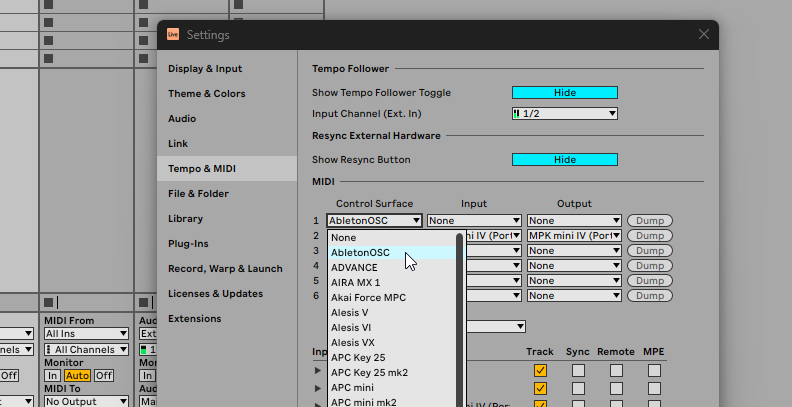
You should see a status line in Live's log saying "AbletonOSC: Listening for OSC on port 11000". That means you're done.
6. Back to ABEL
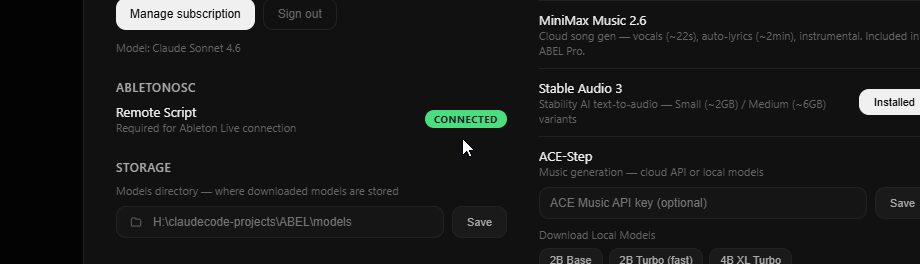
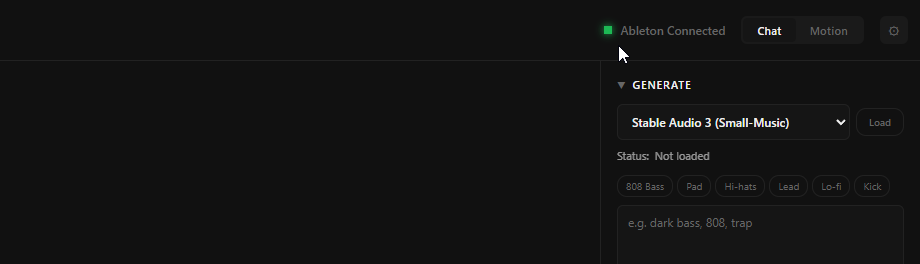
Switch back to ABEL and head to Settings → AbletonOSC. The status should flip to Connected (you may need to hit Refresh). Now ABEL can hear and control your session.
Trouble?
If "Connected" never shows up:
- Make sure the folder is named exactly
AbletonOSC(no-master, no-main). - Make sure it lives directly inside
Remote Scripts/, not nested another level deep. - Confirm Live is version 11 or higher.
- If you have other Remote Scripts installed, AbletonOSC should appear alongside them in the Control Surface dropdown.
Still stuck? Email hi@abel.audio with a screenshot of Preferences → Link / Tempo / MIDI and we'll sort it.